◎ China HQ Suzhou · APAC HQ Singapore ✉ hello@jumborca.com ☏ +86-400-990-7697

Product

JDC · Jumborca Data Cloud

Cloud data protection as a service: one console protects data in Microsoft 365, Entra ID and three public clouds (Azure, AWS, Google Cloud), backups land in an immutable vault, and recovery goes back in place, to a new location or to another cloud.

JDC · JUMBORCA DATA CLOUD The unified cloud for data resilience
  • Data backup
  • Data recovery
  • Data security
  • Data insight
  • Data portability
Shared services
One console · policies and SLAs · identity and roles · audit · metering
Protected workloads
  • Microsoft 365
  • Entra ID
  • Azure
  • AWS
  • Google Cloud
  • Vault

SaaS · no equipment · billed per workload and vault capacity

Data is spread across Microsoft 365, Azure, AWS and Google Cloud, each with its own backup tool, accounts and reports; users, groups, apps and Conditional Access policies in Entra ID get deleted or broken with no version to roll back to; once ransomware gets in, backups and originals sit on the same network and get encrypted together.

JDC (Jumborca Data Cloud) is Jumborca's cloud data protection platform, delivered as SaaS. It puts backup, recovery and the vault for Microsoft 365, the Entra ID directory and three public clouds – Azure, AWS and Google Cloud – in one console: one sign-in, one set of policies, one set of roles and one audit trail. Backup data is change-tracked, deduplicated and compressed before it is written to immutable storage; recovery goes back to the original location, to a new one, or across to another cloud. JDC comes in two editions, JDC for Public Cloud (Azure / AWS / Google Cloud) and JDC for Microsoft 365 (including Entra ID); JDC-Vault is the vault underneath and can also be subscribed to on its own. There is no equipment to buy and no backup server to maintain; you pay for protected workloads and vault capacity.
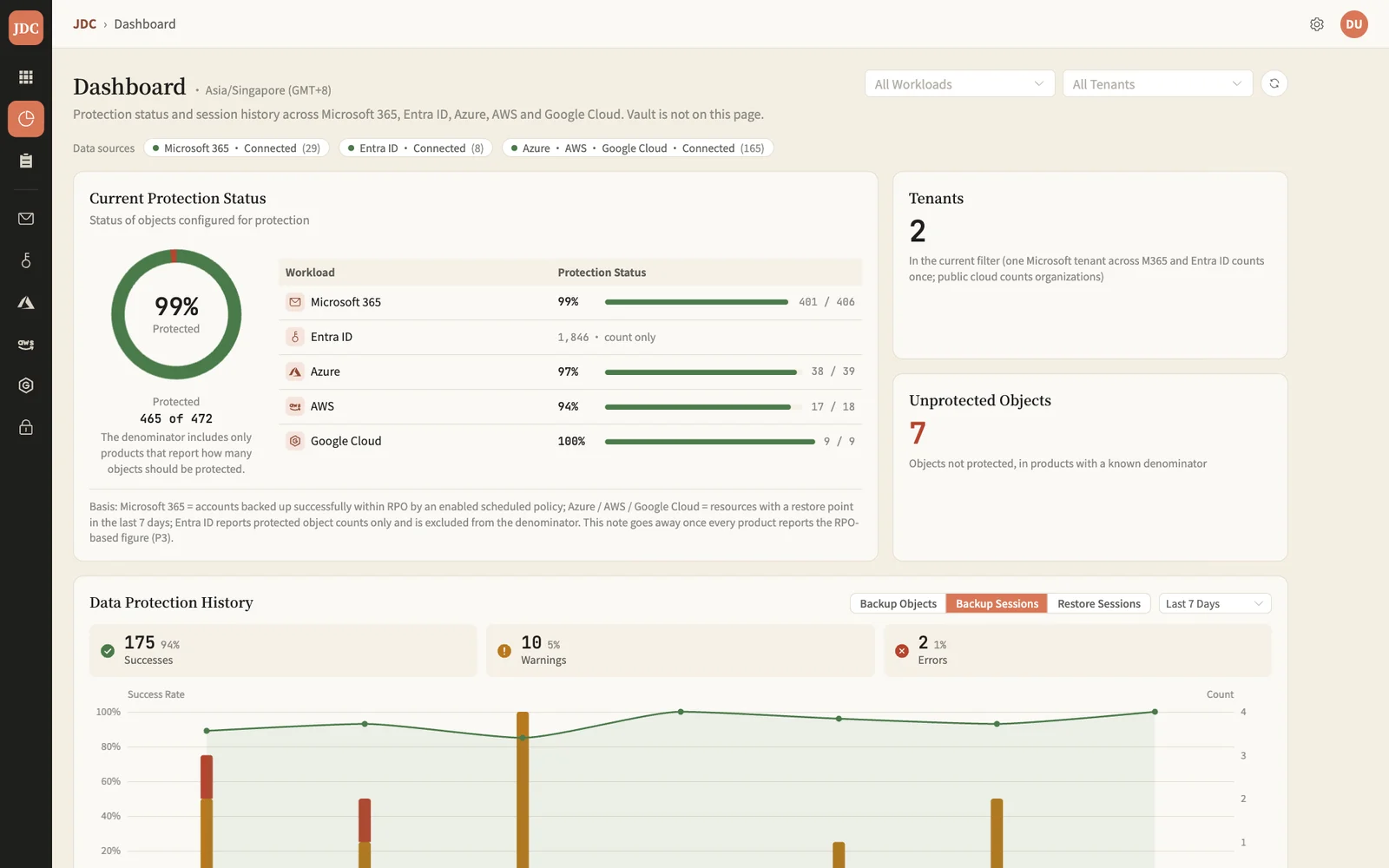
JDC organisation dashboard
One console: protection rate for Microsoft 365, Entra ID and three public clouds, unprotected objects, 7-day backup success and alerts on one screen; the left rail switches products without leaving the console.

Explore by workload

Pick a workload and see how it is protected

Microsoft 365

Mail, files, sites and teams, recovered item by item

Once a Microsoft 365 tenant is connected, JDC backs up mailboxes, OneDrive, SharePoint and Teams by policy into the immutable vault, and recovers by object or by item with no whole-mailbox rollback.

StatusRunning on real tenants: scheduled Exchange mailbox backup, browsing and item-level restore. OneDrive, SharePoint and Teams backup and restore are in acceptance on a test tenant and not written into contracts until accepted.

Exchange Online
Scheduled mailbox backup; pick a restore point per mailbox, view mail item by item, restore to the original mailbox or export
OneDrive and SharePoint
Personal drives, sites and libraries backed up, with file-level restore and export
Teams
Teams, channels and files backed up and restored per team
Platform-managed schedule
Interval-based scheduling, staggered automatically, measured by RPO compliance

Entra ID

Your identity directory can go back to yesterday too

Entra ID is the front door to every app: one deleted group or one broken Conditional Access policy affects the whole company. JDC backs up the whole directory every day, so any day within retention can be compared and restored from; it only reads your directory, with a single least-privilege app.

StatusRunning on real tenants: directory backup, dashboard, object browsing and change comparison. In acceptance on a test tenant: restore write-back, the lockout pre-check before writing Conditional Access back, and audit and sign-in log retention – not written into contracts until accepted.

Objects covered
Users, groups, administrative units, directory roles and assignments, app registrations and enterprise apps, Conditional Access policies and devices, with members, owners and managers
Change comparison
Pick any two restore points to list added, deleted and modified objects, down to the attribute; one chart shows daily change volume for 30 days
Plan before you restore
Every item to be created, modified or skipped is listed first; objects that cannot be restored, such as Microsoft first-party apps, are flagged
Protected and billed counted separately
Only enabled member users are billed; disabled accounts and guests are protected at no charge

Azure

Virtual machines, databases and file shares under one policy

Once an Azure subscription is authorised, JDC discovers virtual machines, Azure SQL, Cosmos DB and Azure Files and protects them with Gold, Silver and Bronze SLA templates. VMs use incremental snapshot diffs with dedup and compression, so only changes reach the vault.

StatusRunning on real subscriptions: backup and restore for virtual machines, Azure SQL, Cosmos DB and Azure Files. Export of Azure SQL on private networks is still in acceptance.

Virtual machines
Incremental snapshots with changed-block diffs, content-addressed dedup and zstd; restore in place, to a new location or another region, with file-level recovery
Azure SQL and Cosmos DB
Databases backed up by policy and restored as new databases; databases on private networks are exported through network isolation
Azure Files
File shares backed up by policy, restored whole or file by file
Policies and SLAs
Gold, Silver and Bronze templates or your own; new resources enrolled automatically, run-now at any time
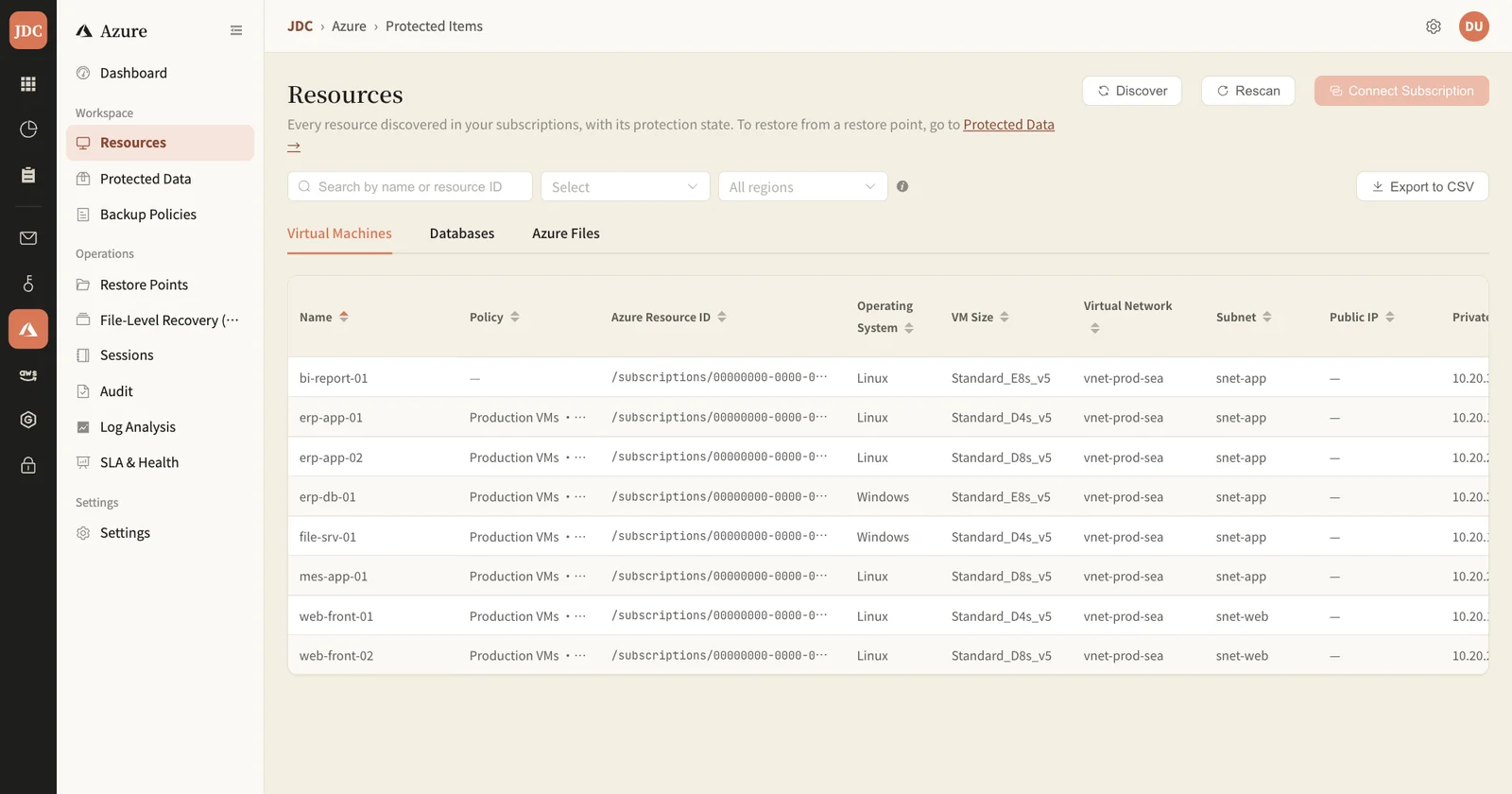
Azure resources
Resources: VMs discovered in the subscription with their policy and protection state; the one left out of policy stands out.
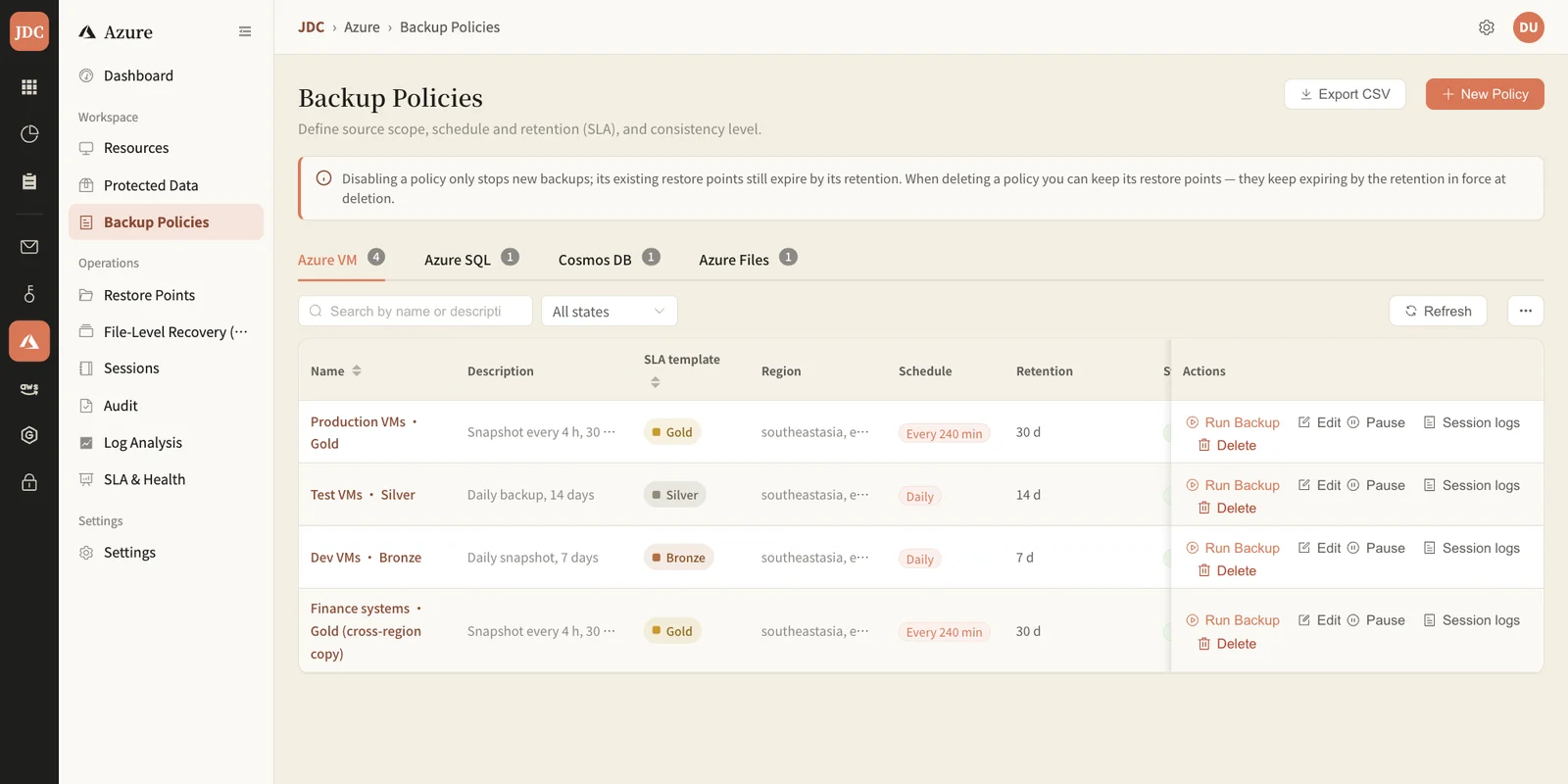
Azure backup policies
Backup policies: Gold, Silver and Bronze SLA templates with schedule, retention and regions in one table; run, pause or edit at any time.

AWS

Incremental EC2 and EBS backup, restored on demand

Connect an AWS account through one least-privilege cross-account role and JDC discovers EC2 instances, EBS volumes and EFS file systems, backs them up by policy into the vault, and restores to new volumes, new instances or the original location.

StatusRunning on real accounts: EC2 / EBS backup and restore, EFS backup and recovery. FSx, RDS / Aurora, DynamoDB and Redshift are in acceptance and not written into contracts until accepted.

EC2 and EBS
EBS snapshots read only changed blocks, deduplicated and compressed into the vault; restore as new volumes, AMIs or instances, with file-level recovery
EFS
File systems backed up, restored to a new file system or by path
Onboarding and permissions
A CloudFormation stack creates the read-only role in one step; cloud credentials sit in a secrets vault and are injected per job
More AWS services
FSx, RDS / Aurora, DynamoDB and Redshift are rolling out
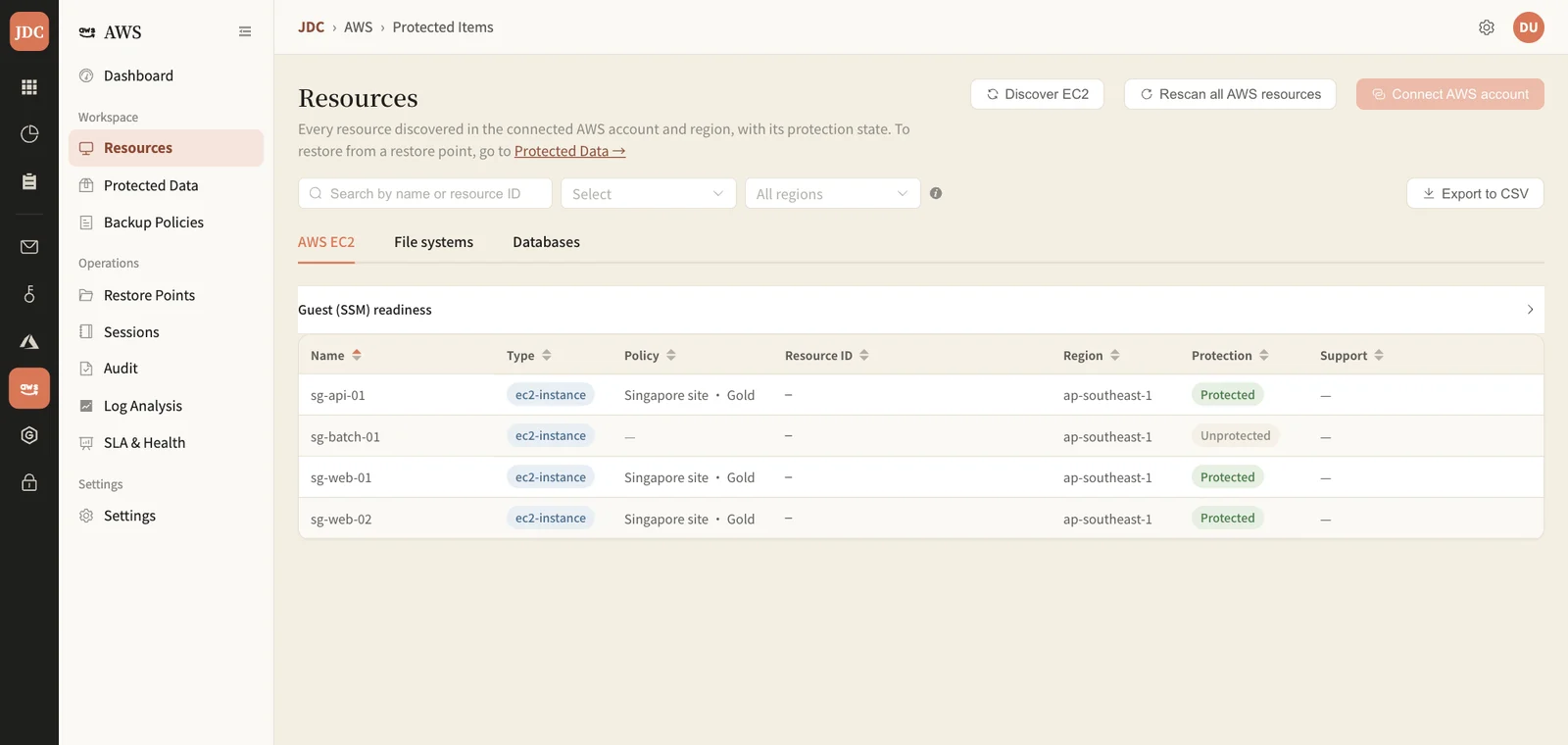
AWS resources
Resources: EC2 instances discovered in the account's configured regions, with policy and protection state.

Google Cloud

Compute Engine VMs with snapshot restore points

Once a Google Cloud project is connected, JDC discovers Compute Engine instances, creates snapshot restore points for persistent disks by policy, and restores them to a new disk and a new instance – with the same pages and policies as Azure and AWS.

StatusRunning on real projects: snapshot backup and restore for Compute Engine VMs. Cross-project restore and writing backup data into the vault are in development.

Discovery
Compute Engine instances discovered automatically, with policy and protection state
Snapshot restore points
Persistent disks snapshotted by policy into restorable points
Restore
A new disk and a new instance from any restore point
One set of policies
Shares SLA templates, scheduling, roles and audit with the other two clouds
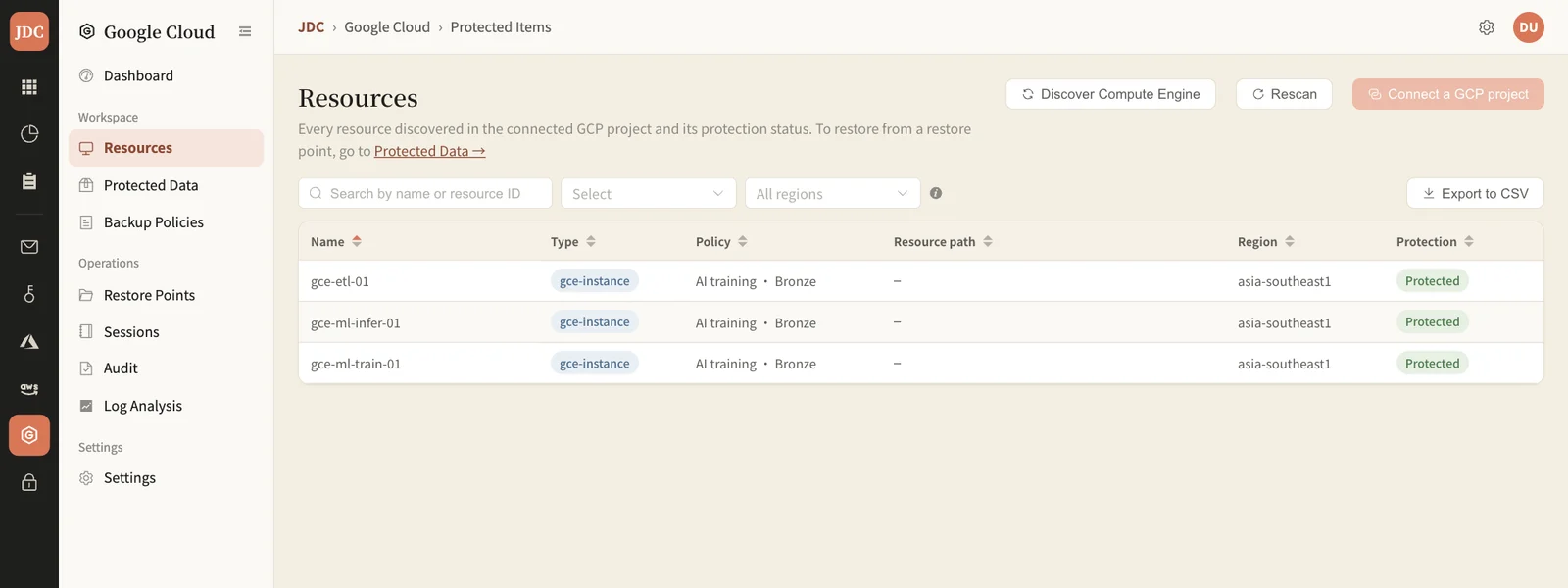
Google Cloud resources
Resources: Compute Engine instances with policy, region and protection state.

Vault

JDC-Vault: the immutable vault

Backups from every workload are written to JDC-Vault. It can also be subscribed to on its own as an immutable target for third-party backup software.

StatusLive: JDC-Vault runs as its own product, on Azure Blob and S3-compatible storage back ends.

Immutable
Locked on write: in compliance mode nobody can delete or rewrite within retention; governance mode can be lifted by an authorised administrator
Legal hold
Data under litigation or audit can be put on legal hold and is kept past its retention
Isolation and direct access
One bucket per customer; direct access uses short-lived, revocable credentials, never the storage account key
S3-compatible
Works as an S3 target for other backup software with the same immutability
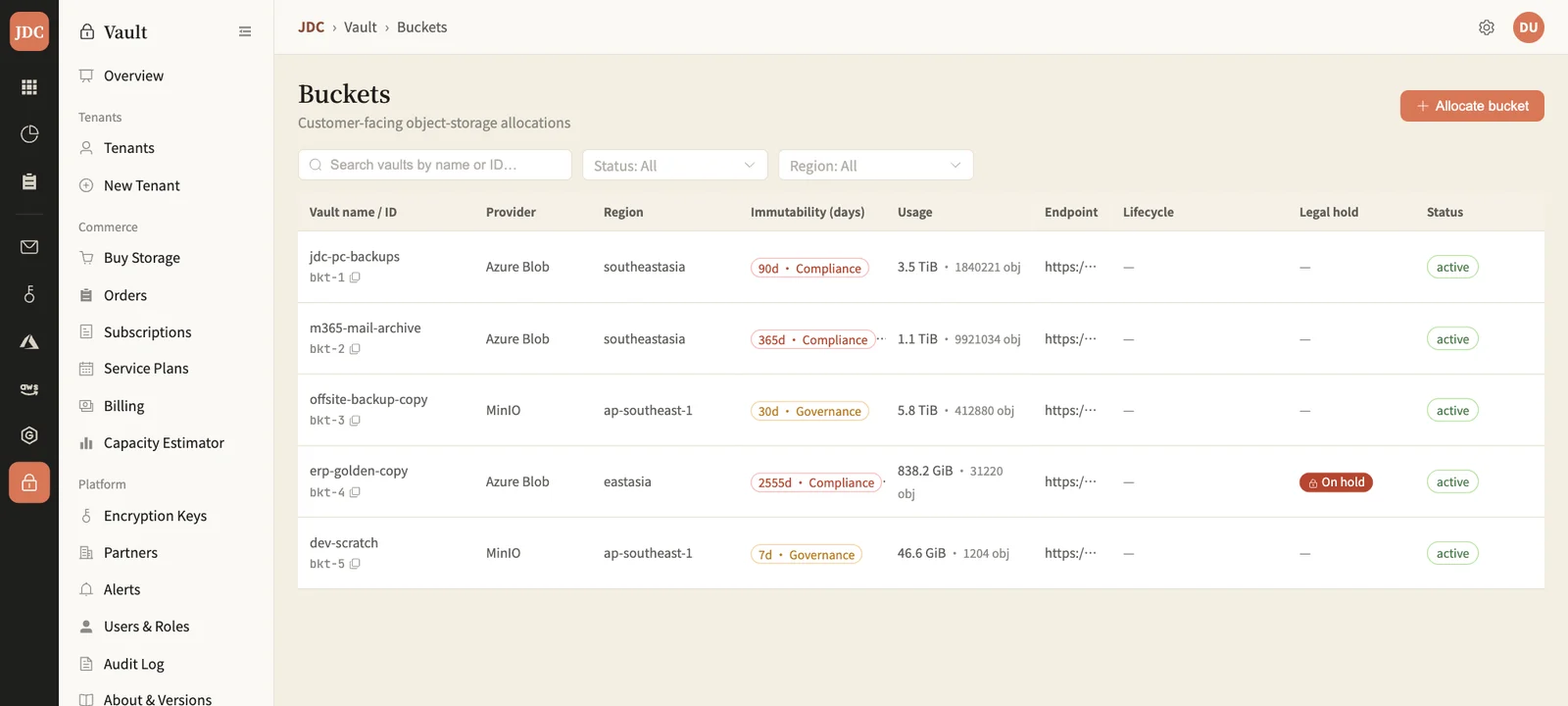
Vault buckets
Buckets: retention and lock mode per bucket (compliance, cannot be lifted / governance), usage and legal hold.

Screens are from a demo environment; organisations, people, resource names and figures are fictional.

Key capabilities

Three things done properly

01

Resilience realised

Backup is a policy, not a chore; recovery has to be fast and precise.

Policy automation
Gold, Silver and Bronze SLA templates set once; new resources enrolled automatically, scheduling managed and staggered by the platform
Precise, fast recovery
A machine, a database, a single file or a single mail; in place, to a new location or another region
Protection you can see
Dashboards show protection rate, RPO compliance, success rate and alerts; unprotected objects are listed on their own
02

Security built in

Designed on the assumption that backups get deleted.

Immutability and isolation
Backups are locked on write and deletes are refused at the storage layer; the vault sits apart from production
Encryption and credential custody
TLS 1.2+ in transit and AES-256 at rest; cloud credentials live in a secrets vault and are injected per job
Common roles and audit
Authorised per organisation, product and role; the audit log is hash-chained so tampering is detectable
03

Simple to run

No equipment to buy, no backup servers to look after.

SaaS, pay for what you protect
Billed by protected workloads and vault capacity, with metering visible in the console
One console
Microsoft 365, Entra ID, three public clouds and the vault behind one sign-in, with one set of reports and audit
Dedicated instance available
Deployable in a cloud subscription or Kubernetes cluster you name, with the same features as the SaaS

Target

One platform: Microsoft 365 + Entra ID + three public clouds

Whether a backup serves is not a matter of faith, but of proof.

FAQ

How do JDC and JDC-Vault relate?
JDC is the cloud data protection platform: backup, recovery and policy. JDC-Vault is the vault underneath it: immutable, isolatable object storage. JDC writes its backups to JDC-Vault by default, and JDC-Vault can also be subscribed to on its own as a target for other backup software.
Can we trial just one workload?
Yes. Each workload is connected and billed on its own: start with one Microsoft 365 tenant, one Azure subscription or one AWS account and add the others later, in the same console.
Where does the backup data live? Can it go into my own storage account?
Yes. By default it is written to the vault Jumborca hosts; you can instead name your own Azure storage account or S3-compatible bucket, and JDC enables the immutability policy on it. Data is encrypted in transit and at rest.
Will JDC change my workloads?
No. JDC reads data through the cloud platform's snapshots and APIs; it installs no extra agents in your virtual machines or Microsoft 365 tenant and changes no resource configuration. Onboarding only needs a least-privilege identity.
Can I recover somewhere else?
Yes. Virtual machines and databases can be recovered in place, to a new location or to another region; Google Cloud VMs are restored from snapshot restore points to a new disk and a new instance; file-level recoveries can be downloaded or written back to the source machine. Restoring Azure virtual machines to a KubeVirt cluster has passed technical validation and is being productised.
How is it billed?
By the number of protected workloads and the vault capacity used (TB per month), both visible live in the console. There is no equipment fee, no licence server, and no charge per backup run.
Can it be deployed privately?
Yes. JDC is primarily SaaS, but a dedicated instance can be deployed in a cloud subscription or Kubernetes cluster you name, with the same features as the SaaS edition and with Jumborca handling upgrades and operations.

Further reading

Commonly combined with
Implementation & migrationManaged recovery drillsBackup as a Service
Related solutions
Storage CenterData Backup & Business ResilienceGo Global

Book a meeting

Pick a time

45 minutes, run on your scenario. No NDA needed first.

Your details

Which products interest you? (pick any)

By submitting you agree to the privacy policy. We keep only your contact details and message. Privacy